Reporting Errors
When Roo Code encounters an error, you can export detailed diagnostic information to share with the support team. This helps resolve issues faster by providing complete context about what went wrong.
Accessing Error Details
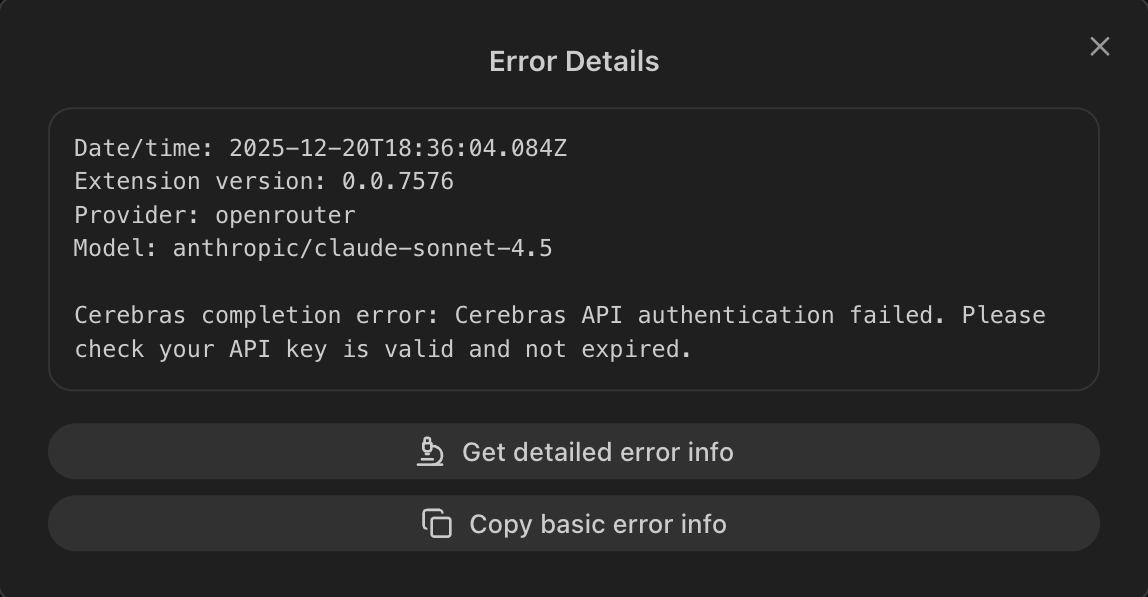
When an error appears, click the "Details" link next to the error message. This opens a modal with diagnostic information and export options.

The Details link reveals two export options for sharing error information with support.
Choosing the Right Export Option
The Error Details modal offers two buttons, each serving different needs:
-
Copy basic error info - Copies essential error details to your clipboard:
- Timestamp and extension version
- Provider and model being used
- The specific error message
Use when: You want to quickly share the error in Discord or a brief support email.
-
Get detailed error info - Opens a full diagnostic report with:
- Everything from basic info
- Complete task history showing all messages and actions
- Full configuration and environment details
- Provider-specific settings
Use when: The support team needs to reproduce the issue or you're filing a GitHub issue.
Sharing with Support
After copying error information:
- Email: Send to support@roocode.com
- Discord: Share in the #support channel
- GitHub Issues: File at github.com/RooCodeInc/Roo-Code/issues
Include a brief description of what you were trying to do when the error occurred. The exported diagnostics handle the technical details.